CF: Decide if we got enough memory to succeed

Since the beginning of computing there has been the struggle between available resources and the number of computing tasks to run on them. When we had 16KB of RAM our code looked very compact and we were critical of any extra bytes that we stored or computing cycles we ran.

When, today, we easily reach 16GB of RAM the level of individual byte analysis does not quite happen. More likely than not, we tend to worry less about do we have enough memory to run this operation and assume (to our chagrin) that things will work themselves out,… right until they don’t.

Which brings me to the problem at hand. Rather than running a process, thread, task and hoping things work, can we predictably make that decision instead?

In my case, this being ColdFusion I needed to find out whether I had a snowballs change in the Hot-Place to open an Excel file. Remember that ColdFusion uses the Apache POI library to read Microsoft Office documents. Works normally fairly transparently but the downfall here (it is documented as well, see POI docs) is that POI will grab big chunks of memory for processing any access to, say, a spreadsheet.

This, if not managed, gets us into an unconfortable situation of crashing the server with OutOfMemroy exceptions. Yep, not good.

So our solution was first determine a common estimation factor (spreadsheet size to JVM memory size), then use it to see whether we would have a chance of opening / loading this spreadsheet at all given the current memory envelope on the server.

Nice message to user if we had no chance, go ahead and process otherwise.

This eliminates unneccesary server crashes. Which is, indeed, a very good thing.

Here is the code snippet we used to determine available CF server memory:


<cffunction name=“getMemory” returntype=“numeric”

access=“private” hint=“return server unused available memory”>

<cfscript>

var intMB = 1024 * 1024;

var objRuntime = createObject(
“java”, “java.lang.Runtime”).getRuntime();

var intUsedMem = objRuntime.totalMemory() – objRuntime.freeMemory();

var intAvailableMem = objRuntime.maxMemory() – intUsedMem;

return (intAvailableMem/intMB);

</cfscript>

</cffunction>

The value here will have to be compared against the expected value of memory use for your operation. For example, if you expect your spreadsheet to occupy 100MB memory while loaded into JVM and want to have a margin on 50MB, you can only proceed with the operation if the return of the above function is a value of 150 or greater.

Cheers,

B.

CF: ColdFusion Debug trace for remoting (Flex, SOAP, anything else)

One of the things I have always liked with working in ColdFusion is the ability to derive detailed debugging information. You get a good idea of what is going behind the covers and do have a good basis to hunt down bugs.
Unfortunatly, this all breaks down when you start to do any kind of remoting (invoking CFCs from another technology). Currently, this is for Flex and SOAP (Webservices) type calls. If anything goes haywire, or the calls themselves are complex, e.g. call on many other components and tags you fly in the dark more often then not.
The common response to this kind of issue from peers is to use the line debugger, set breakpoints etc. and this does work to a certain degree.
However, where I get a little agitated is that most of the time when problems occur you are nowhere near a line-debugger or IDE to capture the processing.
For standard .cfm pages I can use the Silent Debugger option.
So I was wondering if I could build something similar that worked with CFCs and remoting. I would add this to the Application.cfc and, bingo, I could capture the debugging output to file. Alas, many hours later I had nothing workable. To make a long story short it does not look like there is a way to capture cfc debug output, because no debugging session is seems running.

Unfortunatly, it looks like the auto-wiring that ColdFusion performs makes the decision not to initialize / start a degugging session in the ServiceFactory (coldfusion.server.ServiceFactory).
Thus the call for factory.getDebuggingService() will fail and my attempts to manualy start the debugging service failed for lack of insight into how CF actually does this (what classes and method in what order).
So I was back to square one.
After a little more thinking and tinkering I decided to go for the workaround solution. This happens to be practical enough for me as my remoted cfcs are only stubs, so not much functionality is implemented there.
I have several stub types and, thus, decided to rewrite the call from SOAP / FLEX remoted calls to HTTP Post (REST) calls.

So in the remoted call I would just turnaround and call the REST gateway if I detected that we were trying to debug stuff using the IsDebugMode() function.

This would allow me to use the Silent Debugging option and capture the debug output to file even for calls coming from SOAP and FLEX remoting. I would also need to translate the reponse back correctly for FLEX and SOAP clients to consume.

All this is more overhead but not drastically so, while allowing me to trace errors while they occur even for remoted CFCs. I can access this information afterwards for analysis.

Overall, I am disapointed that I was not able to hook into native CF processes to expose debugging results. Maybe in future iterations this will be possible. However, being able to get this insight is invaluable to me.

Feel free to experiment.

Cheers,
B.

CF: cfObjective 2011

Meant to provide feedback on the cfObjective conference in Mineapolis, MN.
The conference goes by the tagline of
“The Only Enterprise ColdFusion Conference”. Unfortunatly, this may be very true.
Anyways, here is the skinny as I see it (fully my opinion):

Even though this is the biggest CF conference that still is around, I was still disappointed by how small the crowd was. No knock on this conference as it comparitively has grown from last year, but with the demise of cfUnited, I was expecting a larger crowd to carry over to this one.

Conversations with fellow conference attendees lead to the insight that instead of one big conference there are many smaller regional ones that focus on this topic.
If this is the trend, the obvious question would be how CF is CF going to survive? Will many small conferences attract developers by the truck load or will they stay away? Adobe did not sponsor, I hear lots of politics involved. Not a good image if you are trying to convince new people to pick up CF and grow the community.

The location was OK. Downtown Minneapolis is not hot but you can make it work. Weather was a bummer (pretty nippy). The food was good, lunch was better than breakfast.

The presentations followed a similar pattern to cfUnited, the same people are doing the presenting. The quality was just a notch above what was available at cfUnited. I am personally getting a little tired of the same presenters, I think the community needs some fresh blood. Only so many times I can hear an extreme opinion presented as fact ;o)
Overall, still something I will attend, but maybe shorten the time for next year. Do only two days rather than three. The last day was just a rush to get out.

There you have it. Catching up on writing.
B.

CF: Coldfusion java.lang.StackOverflowError

If you run into this with ColdFusion, it probably will appear to come out of no-where.
One day everything will work fine and, the next, without any change you can think of, you see your site stop to respond.
Upon digging into the exception.log file you see something like this:

“Error”,”jrpp-0″,”04/20/10″,”17:33:53″,,”” The specific sequence of files included or processed is: C:\Webroot\Test4\TestFile.cfm” “
java.lang.StackOverflowError
at java.io.ObjectInputStream$PeekInputStream.read(ObjectInputStream.java:2263)

This for me occurred when serializing/de-serializing data. But anytime you run into this you have to ask yourself one primary question.
Did this happen because of my logic? If yes, go revise your logic first.
If you are certain your stuff is solid, you need to increase the Stack Size by providing the -Xss directive to the jvm upon ColdFusion startup.

I would bump it four fold; while the default seems to be slightly different based on OS, it is normally in the 300-400kb range.

I bumped mine up first to 10MB, then, reduced it to find out exactly what was workable.

The -Xss argument can be specified in kb e.g. -Xss512k or in mb, e.g. -Xss1m.

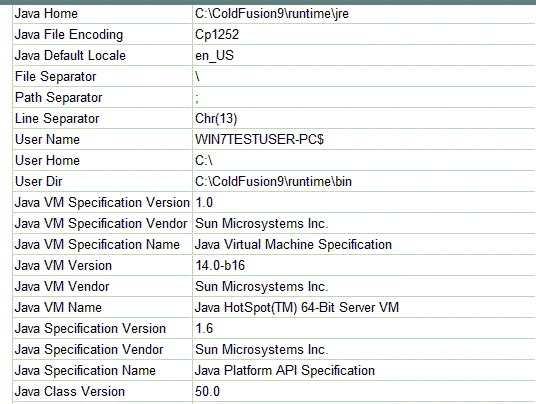
here is an image with configured jvm:

Cheers,
B.

CF: ColdFusion Report Builder migration errors with Invalid construct.A script statement must end with “;”

You may had the opportunity to work with ColdFusion Report Builder in the past. It was a cool little tool that we used with ColdFusion 7 when you could not afford anything else to write reports with.
In its first iteration it was pretty buggy; today, it still is around but I see fewer people using or mentioning it. It barely gets any play at the user conferences and is treated more like a red-headed step child (I have nothing against red headed people of any kind ;o).
In my opinion it is still a useful tool that does not get its share of attention. However, when you migrate from older versions of reports that you have written with, say, ColdFusion Report Builder (CFRB) 7, to ColdFusion Report Builder 8 or 9 you may get some fairly unexpected errors.
Such as this:

Invalid construct.A script statement must end with “;”

The only thing you did it just open and save the report. No changes were actually made. All of a sudden, errors jump up from seemingly nowhere. Well, for me, that resulted in many hours of ghost hunting (since I cannot see what’s in the cfr files) until I finally got the bright idea to dig up an old copy of Report Writer 7 for those reports.

I restored the .cfr file from backup, made a change using CFRB 7 and everything worked. Just to check for sanity, I, then, restored the file again, made a simple change using either CFRB 8 or 9 and, boom, broken again.

The lesson here is to make sure you ask before you touch a ColdFusion report (.cfr) file with which version of ColdFusion/ColdFusion Report Builder it was created. Then, make the modifications only with that tool.

This in the end may save you many hours of frustration.

Cheers,
B.

CF: Explicit “undefined” in ColdFusion 9 results in Bug when using CustomTag Attribute collections

Adobe ColdFusion 9 introduced many new enhancements but as with any major release there are new behaviors and new problems galore.
This particular bug I encountered deals with a change in behavior of component function processing. I encountered this while migrating an application from CF8 to CF9.
In previous releases of ColdFusion an Argument that was not passed would not exist in the arguments scope. With ColdFusion 9, an argument is always created even if not passed if it is part of the arguments declaration in your function.

For example this simple function:


<cffunction name="fTwo">
<cfargument name="argA" default="1">
<cfargument name="argB" required="no">
<cfreturn arguments>

</cffunction>

a dump of this function will return:


1: <cfdump var="#fTwo()#">
2:

ARGA 1
ARGB undefined

Rather than just

ARGA 1

Thus ColdFusion 9 is introducing a new state in the variables, the Explicit “undefined”.
Since this is a new state all function working with CF objects/ i.e. variables will also need to be aware of it. And most are and, thus, little problem.

However, if you introduce some slight alterations, e.g. call a custom tag from a component, this system fails.
You will get errors as the IsDefined() function will identify something as defined while it is not.

Let’s introduce a simple custom tag (CT9Test) with the following 6 lines of code:


1: <cfdump var="#Attributes#">
2:
<cfif IsDefined("Attributes.ArgB")>
3: Attributes B is defined
4:
<cfelse>
5: Attributes B is NOT Defined
6:
</cfif>
7:
8:

First let’s call this custom tag from the function like so:

1: <cffunction name=“fTwo”>
2:
<cfargument name=“argA” default=“1”>
3:
<cfargument name=“argB” required=“no”>
4:
<cf_CT9Test attributeCollection = “#Arguments#”>
5:
</cffunction>
6:

Nope. This is still good. No problem here. But, let’s go ahead and break ColdFusion:

1: <cffunction name=“fThree”>
2:
<cfargument name=“argA” default=“1”>
3:
<cfargument name=“argB” required=“no”>
4:
<cf_CT9Test anotherVar=“something” attributeCollection = “#Arguments#”>
5:
</cffunction>
6:

You see the difference?
We are simply adding another parameter to be passed to the custom tag in addition to the attribute collection received from the function arguments.
In the above case, the attributes.argB all of a sudden becomes defined. But since it is explicitly “undefined” using it will throw weird errors.
Something like:
if (IsDefined(“attributes.argB”) ) calc=attributes.argB + 1;
will fail.

The workaround to this is to go back to scenario one and not use any additional parameters when calling your custom tags and using attributeCollection. Package all parameters into one structure, e.g.

1: <cffunction name=“fFour”>
2:
<cfargument name=“argA” default=“1”>
3:
<cfargument name=“argB” required=“no”>
4:
<cfset arguments.anotherVar=“something”>
5:
<cf_CT9Test attributeCollection = “#Arguments#”>
6:
</cffunction>
7:

Now that you know this. Happy migrating.
-B

CF: Railo 3.2 Released

After much work the Railo team released the new version (3.2) of Railo over Christmas.
Railo is one of the Open Source ColdFusion application engines available. The other notable one is Open Blue Dragon.
If you are doing ColdFusion based programming this is something that should belong to your stable of tools that you are familiar with.
In the past the discover-ability of Railo was harder as it was not as easy to understand how to get things going once you downloaded it. Though technically simply the step of getting it installed and going was a hurdle that made it harder than the Adobe engine.
With this release among a myriad of enhancement installers were made available for multiple platforms. For example, for the windows platform the comparable Railo installer is one third the size of Adobe’s while it handles both 32 and 64 bit installations.

Happy Experimenting,
B.

CF: ORM EntityDelete without EntityLoad

I must admit I am not a fan of the EntityDelete() function. Its inability to handle multiple records always nagged me. I know I can allways go back to CFQUERY or use ormexecutequery(). But what nagged me the most appeared to be the need to do an EntityLoad before I could remove the entity/record. This could potentially introduce unneeded database reads and latency.
e.g.:
myBook = EntityLoad(“Book”, 100, true);
EntityDelete(myBook);

Well it turnes out that the use of EntityLoad is not required. A colleague suggested I try the following instead which would eliminate the load operation, and since I thought that was pretty neat I am sharing ;o)

mybook = new Book();
mybook.setBOOKID(100);
EntityDelete(mybook);

In this fashion, you are creating the object reference in memory and guaranteeing that there is only one DB interaction at DELETE.

Cheers,
Bilal

CF: The varExists() function — Expanding IsDefined() to work with regular array and associative array notations.

Many times while working in ColdFusion code I am encountering the simple need to check for the existence of an index in an array, e.g. myArray[3]. While other languages may have had easier checks on this, in Adobe ColdFusion, I unfortunately, have to work around this scenario with many lines of code or different functions to call. Thus, I am able to construct fully well formed variable references and use them, but cannot check their validity in a simple fashion.

For example, I can’t do a simple call to a universal function such as IsDefined(“myVar[3]”). In this simple scenario we could have used ArrayIsDefined(), however, the scenarios I normally deal with are not so simple. In my scenarios I am not sure about whether “myVar” is an array in the first place or whether the index is numeric. E.g. I may need to check myVar[checkIndex]; this maybe a strucure with an associative array notation which takes me back to square one. Along these lines, multi-dimensional arrays such as myArray[3][4] are equally unqualified for ArrayIsDefined().

Similarly associative array notations that can be used with structures, e.g. myStruct[“testNode”], equally do poorly on these checks and could require some sort of special checking and more lines of code.

How about a combination of things:
TestStruct.Animals[‘species’][1][‘counts’][2]

All of these scenarios go beyond the ability of IsDefined() or other functions and cause more code to be written. Maybe this would be an opportunity to expand in future version of ColdFusion but for now we’re stuck or are we? (yeah, rhetorical question this one).

I made this a test project and developed an alternative function, varExists(), to IsDefined(); it may not be usable in all scenarios but will come in handy in coding.
The sample implementation can be downloaded here (varExists.zip (3KB)).

The first objective was just to be able to handle the complex notation scenarios that commonly fail under IsDefined().

e.g.:
varExists(“TestStruct.Animals[‘species’][1][‘counts’][2]”) should operate without a hitch on complex variable notations. While at the same time maintaining full backward compatibility with IsDefined(). So you should be able to do things like this varExists(varName), varExists should check for the existince of the content referenced by the content of varName, e.g. a string such as “TestStruct.myArray[2][1]”.

But, why stop there, the next thing that I commonly do once I check for the existence of a variable is to retrieve its value for some sort of operation, so I added this option as second argument. Thus, varExists will automatically return the value referenced as part of its operation if “True” is passed as second argument, e.g. varExists(“myUserArray[33]”,true). This would return the UserName at array index position 33.

Another common task I perform when the value is not known or “undefined” is to assume a default value. Thus, I added this as third parameter. When a third parameter is supplied it will be returned, when the actual variable reference is undefined.
For example:
varExists(“myUserArray[33]”,true,”John Doe”)
would return “John Doe” if the array index 33 is not populated for some reason.

The example code has the test array and unit tests with sample scenarios. The hope is that eventually the ColdFusion language can accommodate these type of operations natively.

Happy experimenting.

Cheers,

B.

Addition:

The Railo CFML engine does not exhibit the flaw outlined in this article. Thus, if you use Railo, you probably will not encounter scenarios in which you can construct a valid variable reference but cannot check for its existence. The IsDefined() function works as expected, however, if you want the expanded functionality of retrieving variable values etc. you would still need to use the varExists() User Defined Function (UDF) provided here.

Best,

B.

CF: Connecting 64-bit Coldfusion to 32-bit MS Access databases

First off, don’t ask me why you would want to do this, just go with the flow.
In other words, let’s not get bogged down on how you should not put anything on Microsoft Access anyway and accept the fact that there is still many applications that are perfectly happy with it ;o)
The problem has existed for a while but it dawned on me more clearly as I was sitting in on a hands-on beginner CF class at NC Dev Con and several of the participants immediately ran into this with their brand spanking new, high powered, Windows 7 64-bit computers.

So it seems more common that you would want to take the 64-bit edition from Adobe for a spin. But as soon as you attempt to connect to anything 32 bit you receive non-descriptive errors such as:

Unable to update the NT registry. Variable DRIVERPATH is undefined.

Maybe dropping those options from the list of available drivers would have been wiser and less frustrating for users. Something for Adobe to ponder about I guess.

Microsoft does not have any (as of this writing at least) ODBC drivers for 64-bit Microsoft Access; in general, not much ODBC activity in a long time from the Microsoft camp. So, you might be well able to load up Office 2010 in 64 bit format; using the resulting databases for your projects, however, is a fairly complicated tasks.

As with all workarounds there are many steps to complete, so here we go:

1.) Download and Install 64 bit SQL Server 2005 Express Edition. You cannot use SQL Server 2008 Express edition, so don’t try. It is lacking the needed OLE DB Provider.

2.) Download and Install Management Tools

3.) Download and Install Microsoft SQL Server JDBC drivers

For steps 1 through 3 here is a nice tutorial by Steve Brownlee – Fusioncube

4. ) Copy your MDB somewhere, e.g. c:\temp

5.) Created Linked Databases using Microsoft Jet 4.0 OLE DB Provider

a) Linked Server Menu. Right click on the Linked server node and then click on “New Linked Server…” sub-menu option:

b)linked server dialog. Product name can be anything you like. Data source should point to your access file:

6.) Create DS in CF Admin

a) create type other

b) specify data source connection properties

7.) Create sample code for CF. Your query code has to be changed, so you might want to create a variable to hold your prefix to your tables in case you change from 64 bit to 32 bit and vice versa.

Note that you have to use the four part syntax to query out of a linked MS Access to SQL database. You are just omitting two parts, there is also another syntax possible : Openquery(Linked_Server, ‘Query’) which I will not dig into.

To specify a query table in your access database you start with the name you have entered in SQL Server while the creating the link. In my case this is “Northwind”. This name is followed by three periods (…) and, then, by the actual table name:
e.g. : NORTHWIND…EMPLOYEES

Here is my example code:
HelloNW.cfm file:


<cfquery name="selNorthwindEE" datasource="Northwind">

SELECT *
FROM NORTHWIND...EMPLOYEES

</cfquery>

<cfdump var="#selNorthwindEE#">

8.) Enjoy

Cheers,
B.