CF:Flex: FOF: Flex on Fusion, thoughts on what it takes to create a unified framework

The Situation

If you have worked on either Flex or ColdFusion you know that nowadays there is more development frameworks than people know what to do with.
At one point having a consistent pre-defined path to application development on either of these platforms meant you had to invent wheels many times over. Now, the situation has changed to one where you attempting to decide which framework to use; long discussions and passions are aroused.
At some level this has become as counter-productive as the use of no framework was before.
Here are the commonalities I noticed:

a) Frameworks are for developers:

You have to learn the platform, learn the framework and have some sort of knack for writing code.

b) Frameworks only cover one or the other technology.

They do not span technologies, even if your application is expected to. Thus if you have to write an app that uses a ColdFusion back-end and a Flex front-end; you have to put the puzzle together yourself. One may even say we are back where we were several years in the no framework days.

I understand, there are wizards to get you started in both directions, e.g. CF wizards for flex, and flex wizards for CF, but a wizard a framework does not make ;o)

Don’t get me wrong. There are some cool things being done with scaffolding to generate fully fleshed out UIs that are generated from a database, a la Ruby. For example, check out Apptacular.

c) Frameworks focus on developer application parts

Frameworks focus on allowing programmers a base structure that can expanded. Most of this centers around the use of the MVC pattern in one form or the other. However, less attention is given on other services needed in order make an application complete or usable.

For example commonly left to the programmers are things like internationalization, user management, rights management, currency and data management, skinning management.

The Thought

Using frameworks either on ColdFusion or Flex is nothing new. Creating a Framework that spans both is. Thus the idea of Flex on Fusion (FoF) came into my head and just would not let go. I thought, well, now what? Do you really want to create yet another framework even if the idea sounds cool. Who would want to learn it? and Why?
But, for some reason, the idea was persistent and would not easily go away by itself.
More thinking occurred and I do think that this framework has to enable the user (not necessarily a developer) to quickly built full applications. More like the Magic environment, more graphical, less focus on writing code.
And so I am putting it out here to gather feedback and expand on it.

The idea is not to obsolete all other frameworks, rather build a more user centric framework that can be used along with other frameworks. Thus, you should be able to use platform level frameworks to construct sub-pieces. Use the stength of each plattform, CF, for the database and logic, Flex, for advanced visualation and UI, in a combined stronger form.

I am envisioning a startup process that walks the user through the basic steps, e.g. pointing at the database and determining a subdirectory to write the model implementation, etc. This is similar to other scaffolding models; however, the application that is built will also have a user and security model. More importantly, after the basic build is finished, there should be a UI that can be used to define the application further without coding. Adding more data/screens should all be doable via UI. In the extreme thought the UI would expose an IDE for the pieces that require coding.

Once an application is generated, it can extended easily be extended while it is running by users with sufficient permissions.

I will post some more detail describing screens and workflow in a bit.

Cheers,
B.

CF: Java: Using free VisualVM tool to monitor running ColdFusion Servers

You may have had a chance to use the VisualVM tools in the past and found them helpful to get an idea on what is actually happening on the VM while your code is running.

The VisualVM tools can help you detect memory leaks in progress as well as other constraints on your server before it crashes. But even after a crash these tools are helpful. The tools are very graphical and easier to use than attempting to read thread dumps and heap dumps manually.

Here are some simple steps to use this great tool set with ColdFusion.

1) download java jdk 1.6.09 or later
http://java.sun.com/javase/downloads/index.jsp

2) Download Visual VM
https://visualvm.dev.java.net/

3) Configure Coldfusion jmx access
Best way is to go to Coldfusion Administrator Java and JVM settings section.
Add the following parameters:

-Dcom.sun.management.jmxremote.port=8701
-Dcom.sun.management.jmxremote.ssl=false
-Dcom.sun.management.jmxremote.authenticate=false


You can decide whether to use ssl or not, and also on the port to use. If you want to use jmx authentication I would recommend you read:
http://java.sun.com/javase/6/docs/technotes/guides/management/agent.html#gdenl

4) Configure your Visual vm start up to point to your jdk if you have not set environmental variables:
e.g. on Windows
if you extracted the visualvm files into C:\Java\visualvm_122
and
Your JDK is located in C:\Java\jdk1.6.0_19
then you can use the following command line:

C:\Java\visualvm_122\bin\visualvm.exejdkhome “C:\Java\jdk1.6.0_19”

I put it in a batch file that I can start easily.

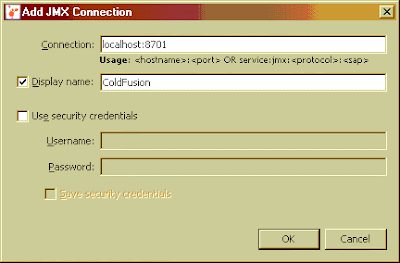
5) Start up the VisualVM tool (it may have to go through calibration first, simply acknowledge), then, and establish a connection a JMX connection by right clicking on the local node and choosing “Add JMX Connection…”

6) Add connection parameters

Now you should be able monitor your server as it runs. I found this to be more stable than the Server Monitor in Enterprise versions of ColdFusion especially under load. It does not have all the same information but you can get a detailed breakdown of VM memory use.

To get into the details of which CF code is using memory you have to generate a heap dump and use the heap walker to run the analysis. All the classes starting with cf… are your code running on the VM.

You also have the option to monitor remote ColdFusion servers as well. You monitor multiple remote and local CF instances in one console, however, unlike the local monitoring, you cannot generate a heap dump when using remote connections.

Creating a remote connection involves two steps in VisualVM after you enabled jmx access on ColdFusion.

a) Adding a remote host. You do that by right clicking on the “Remote” node in VisualVM

b) Specify the host name and display name and connection jstatd port (this is the same port you set in your CF JVM start up parameters). You will need to use the Advanced Settings dialog to do this. The port should be the same you set in the ColdFusion Java and JVM settings for that instance of CF.

c) Set up a remote JMX connection by right clicking on the server name node and choosing “Add JMX Connection…”. This will bring up a similar window as in step 6 above. Fill in the server and port information and you should be able to see your server.

Another common use for the VisualVM tool is analyse a Heap Dump after a VM crashes due to memory problems. You can open and walk through the final VM Heap state. To make ColdFusion produce a heap dump you will have to change the jrun.config file and add this config option:

-XX:+HeapDumpOnOutOfMemoryError
If there is a crash the heap dump should be a text file located in your {coldfusion}\bin folder.

More information on how to use the VisualVM tool is available on the VisualVM website; definitely worth a look.

Cheers,

-B.

CF: Dynamically changing Application.cfc using server specific configuration files

This started as I was reading an old post from Ben Nadel.
I did see that Ben was using a methodology to set up Application startup parameters in a special config function and commented on it.
I wrote about our experience with externalizing these parameters into specific configuration files instead and Ben stated that copying could be a problem if you override the config files.
Here then is my thoughts on how to keep external xml files to describe application specific settings, e.g. production vs test vs datasource names, timeouts, etc.
Nothing new here right? But the goal is to be able to keep the configuration files without a headache and conflicts.
Lets take a sample set of parameters in a file like so:

<wddxPacket version=‘1.0’>

<header/>

<data>

<struct>

<var name=‘REQUESTERRORHANDLER’>

<string>RequestErr.cfm</string>

</var>

<var name=‘VALIDATIONERRORHANDLER’>

<string>ValidationErr.cfm</string>

</var>

<var name=‘EnableErrorHandlers’>

<string>No</string>

</var>

<var name=‘DEBUG’>

<string>No</string>

</var>

<var name=‘ADMINEMAIL’>

<string>change_please@mycompany.com</string>

</var>

<var name=‘DATASOURCE’>

<string>APPDS</string>

</var>

<var name=‘APPLICATIONNAME’>

<string>StandardName</string>

</var>

</struct>

</data>

</wddxPacket>

The trick here is to be able to have a system which allows you to keep different configuration files without fear of overwriting them; and, even if you do copy over them by accident (or even if you have many different ones), the system will be smart enough to pick the correct one.

My implementation (Application.cfc) for this looks like this:


<cfcomponent>
<cfscript>
//start off by reading config file, read contents into this.stcConfig
initConfig();
//set application options from config file
this.Name=this.stcConfig.ApplicationName;
this.SessionManagement=
"Yes";
this.SessionTimeout=this.ConfigTimeout;
//other application parameters can be set
</cfscript>


<cffunction name="onApplicationStart" output="No">
<!--- no need to lock app scope variables in this function unless called from
another function --->


<!--- now make the config file data available to the application scope (bsoylu 03-17-2010) --->
<cfset Application.stcConfig = this.stcConfig>

<cfset Application.ConfigFile = this.ConfigFile>

<!--- we are setting some dynamic Error Handlers --->
<cfif IsDefined("this.stcConfig.EnableErrorHandlers") and this.stcconfig.EnableErrorHandlers>

<cferror type="REQUEST" template="#this.stcConfig.REQUESTERRORHANDLER#" mailto="#this.stcConfig.AdminEMail#">
<cferror type="VALIDATION" template="#this.stcConfig.VALIDATIONERRORHANDLER#" mailto="#this.stcConfig.AdminEMail#">
</cfif>

<!--- do other stuff now ...--->


</cffunction>


<cffunction name="OnRequestStart" >
<cfargument name="CallPage" type="string" hint="This is the page the user is calling. This argument is populated by CF automatically.">

<!--- do your request work --->

</cffunction>


<cffunction name="OnRequestEnd">
<!--- finish up your request code goes here --->

</cffunction>


<cffunction name="getIP" returntype="string" access="private" hint="return server main IP address">
<cfscript>
//get Inet Address type object from JVM

var objInetAddr = createObject("java", "java.net.InetAddress").getLocalHost();
return objInetAddr.getHostAddress();
</cfscript>
</cffunction>

<cffunction name="initConfig" access="private" output="Yes" hint="load config file">

<cftry>
<!--- first check for server specific config file config.XXX.XXX.XXX.XXX.xml, e.g. config.196.18.12.78.xml --->
<cfset strConfigFile = getDirectoryFromPath(getCurrentTemplatePath()) & "config.#getIP()#.xml">

<cfif not FileExists(strConfigFile)>
<!--- fall back to global config file --->
<cfset strConfigFile = getDirectoryFromPath(getCurrentTemplatePath()) & "config.xml">
</cfif>

<cfif FileExists(strConfigFile)>

<cffile action="READ" file="#strConfigFile#" variable="strConfigWDDX">
<cfif iswddx(strConfigWDDX)>

<cfwddx action="WDDX2CFML" input="#Trim(strConfigWDDX)#" output="this.stcConfig">
<!--- save the config file that we use --->
<cfset this.ConfigFile = strConfigFile>
<cfelse>

<cfthrow type="INIT" detail="Incorrect Configuration File. No WDDX detected.">
</cfif>
<cfelse>
<cfthrow type="INIT" detail="Missing Configuration File. No global or server [#getIP()#] specific configuration file found.">

</cfif>

<!--- prepare timeouts --->
<cfif IsDefined("this.stcConfig.SessionTimeOutMinutes") and Val(this.stcConfig.SessionTimeOutMinutes) GT 0>

<cfset this.ConfigTimeout = CreateTimeSpan(0,0,Val(this.stcConfig.SessionTimeOutMinutes),0)>

<cfelse>
<cfset this.ConfigTimeout = CreateTimeSpan(0,0,20,0)>

</cfif>

<cfcatch type="Any">
<cfoutput>#cfcatch.detail#</cfoutput>
<cfabort>
</cfcatch>
</cftry>
</cffunction>

</cfcomponent>

The idea here that the Application.cfc selectivly loads configuration files. It looks for a server specific configuration file, e.g. config.10.10.1.100.xml , then a global configuration file, e.g. config.xml.
Allmost all of the important work occurs in the initConfig() function. It determines the machine’s IP address then alternatly looks for a machine specific configuration file, followed by a global configuration file. If neither can be found, we throw an error.

Thus, even if I copied my development server’s configuration file by accident to the production server it would not be of consequence for the production server. I am of course subject to the normal human errors. If I delete all configuration files I am hosed anyway etc.

Try it out and let me know if this helps.

Cheers,
-Bilal

CF: Flex: PGP Implementation for ColdFusion

Pretty Good Privacy (PGP) is a computer program that provides cryptographic privacy and authentication.
PGP is often used for signing, encrypting and decrypting e-mails to increase the security of e-mail communications. It was created by Philip Zimmermann in 1991.

The use of PGP in file exchanges has increased over the years and has become a common way of securing file contents. Thus, encountering this in more and varied projects is not unusual.

There are several implementations for popular platforms such as Java and .net; I classified them into brought camps of heavy commercial, or hard to use open source; thus the availability of easy to
implement PGP solutions for ColdFusions is limited. In particular, I found existing implementation rather difficult to use.
Thus, I embarked on this project. To make a long story short, I ended up using the underlying work of the
league of bouncy castle folks. The complete source code for those libraries can be downloaded from there.

I implemented the most common scenarios (generate keys or key rings, encrypt and decrypt) and exposed all this through a ColdFusion component to the world. Thus the effort to use of PGP is reduced to one liners of code (which I like).

Along the same lines, if you use Flex and needed a library to encrypt/decrypt this implementation can easily used as backend for that kind of scenario. A few tweaks to the main component should allow you to call on all the functions, read, write, generate keys etc.

Of course, there is so much more that can be done with PGP. Time permitting I may expand this implementation to expose other functionality.

You can download this from Github (https://github.com/Bilal-S/cfpgp/releases/tag/2.0.0).

Cheers,
-Bilal

CF: Connecting ColdFusion to Microsoft Azure SQL

I am impressed by what Microsoft has been able to create with the Azure platform. The more I play with it the more I like it. What impresses me most is how simple it is to get going (I am comparing with Amazon). The big caveat here is that you use MS technologies. If so, Azure should be on the short list for evaluation.
However, and, here I go again reversing myself, if you want to connect a ColdFusion front end to a Microsoft Azure SQL back end, things are a little more quirky. Please don’t ask why you would do such a thing, just stay with me in that it is highly cool ;o)

First, you should evaluate whether your application will give to this kind of setup. On the ColdFusion side you should have good control on the amount of data you exchange with the database(pagination and other techniques); you also should have some tolerance for higher latency; there is delay in the round trip to get data from Microsoft etc.

Of course the usual evaluation of whether you are ok with hosting data in the cloud should take place. But on the other hand, taking this for a spin is easy enough.

In my setup I am hosting the CF server on my laptop and MS is supplying the database.

1) Learn about Azure: Learn about Azure things and then Create Account

2) Create your first database instance online using your browser

3) Get your tools. You do not need to download the Visual Studio or other SDKs to work with SQL Azure, but you will need to use the SQL Server 2008 R2 Management tools. Currently only available as CTP edition.

4) Optional: Migrate some data. For me, using the script wizard in the Management Studio worked the best. You can switch it to produce SQL Azure specific scripts, but you still have to tweak them. Your primary keys have to be clustered when creating tables.
e.g.:

CREATE TABLE [dbo].[TestTable](
[Test_ID] [int] NOT NULL,
[TestName] [nvarchar](50) NOT NULL,
[TimeZoneOffsetHours] [smallint] NULL,
[TimeZoneOffsetMins] [smallint] NULL,
CONSTRAINT [PK_TestTable] PRIMARY KEY CLUSTERED (
[Test_ID] ASC
)WITH (STATISTICS_NORECOMPUTE = OFF, IGNORE_DUP_KEY = OFF)

5) Once you have some data we start with the ColdFusion parts. I have not been able to use the Adobe supplied drivers. I had to download the Microsoft JDBC 2.0 drivers. When you extract the jdbc drivers there are two .jar files. For CF you will need to use [sqljdbc4.jar]. Copy this driver into [cfroot]\lib folder.

6) Restart ColdFusion

7) Configuring your Data Source in the ColdFusion administrator. Here it gets a little complicated. You need to create a data source of type “other”. Also, you cannot use the connect strings that are supplied by MS directly, though pieces are useful. The current stance is that Microsoft does not support JDBC connection but if you can work it they are fine with it. To make it simple I am attaching an image: (please note the way in which we have to set the User name)(replace myID with the database User ID and myServer with your server name from Azure):

8) Configure your connection settings. The Azure platform will drop your connection frequently. So maintaining connection is not really an option. This is what worked best for me to make it appear as if we had no connection issues.

Ok, hopefully this all worked out for you and you can take this for a spin.

Cheers,
Bilal

CF: Parsing Complex Fixed (Flat) Files

Despite many years of XML, the use of simple and complex flat files as a means of exchanging information between systems is still fairly common.
Parsing simple, tabular, flat files like the one below does not really pose a large challenge as either the OS (Text Drivers) or CF (CFHTTP) have tools to read them in without much fanfare.

Example 1: Tabular Fixed File

However, many times over, the examples are not as simple. The data on each row may be different; relationships may exist between lines of data etc.

Example 2: Complex Fixed File

For the complex files we normally write specialized parsers or transformations. Certainly a whole industry exists that deals with Extract Transform Load processes. Either choose requires considerable programming efforts.
After writing a parser for the umpteens fixed file that someone wanted to have loaded, I thought there needs to be a better way. The short of all this is that I created a more generic component to deal with this in native ColdFusion. The solution was to split up the code and the file definition.

Thus, in order to parse complex files, you provide an XML definition file which describes the flat file. Then call the component to do the heavy lifting.

Example 3: Flat File Definition XML

The outcome of such processing are standard ColdFusion objects that are easier to deal with and require less programmatic effort to implement.

I posted this project on RIAForge (FixedFileReader). It contains examples for different scenarios of varying complexity. I added skeletons for EDI X.12 and VCF4 formats.

May not work for all, but if it does, it is likely that it will save a lot of time.

Cheers,
Bilal

CF: Controlling Time Based Runtime Exceptions

Ultimately time controls everything. This is true in larger scheme of things but as well in writing and running ColdFusion code. Fortunately, many CF tags have built in time controls in forms of exceptions that can be thrown when a pre-specified time has been exceeded. Most tags implement this through a timeout attribute.

You, then, use a CFTRY/CFCATCH combination to handle timeout occurrences, e.g. a web page failed to respond, or FTP didn’t connect, etc.

However, this system breaks down if your intent is control multiple tags in combination, e.g. a combination of CFHTTP and CFFTP may take up to 30 seconds though individually CFHTTP or CFFTP may consume a variable amount of time.

Similarly, you are running a multitude of small steps in a loop, e.g. loading 1000 records, or displaying 500 lines. Though each line will only take a fraction of a second to process the number of lines in aggregate will blow you out of the water.

Normally in these cases we would wait on an overall page time out if we had one, then produce a generic catch all message saying your page has timed out and good luck trying this again.

This may suffice generically speaking, but may prove to be frustrating for users and visitors of your apps and sites.

What if you could instead be more pro-active. What if you could predict how long your processing is going to take, even on shared servers with varying loads?
What if you could give users options to either proceed, adjust your number of iterations, or simply stop early because you will never finish the task at hand in the time given.

Ideally your code would be very compact:


<!--- check prediction --->
<cfif objTC.WillTimeout()>
<!--- we will timeout lets do something about it --->
...

Conceptually speaking this could have been done for a long time in CF, but practically I have seen few implementations.

Let’s look at what it would take to make this prediction using a scenario in which we have a repetitive core process that we need to time. Thus, it would be all about the ability to measure time for each loop. Thus we would
a) need to start a timer, e.g. GetTickCount()
b) end the timer, e.g. another GetTickCount()
c) measure the difference between start and end time
d) use the remaining iterations to come up with how much more time we need

Simple, right? Indeed it is. But the downfall is that it doesn’t work.
The system breaks down because of the high variability in practice between each iteration of the loop. Using the built in CF function GetTickCount() we could establish a start and end time. But, when we measure the execution time between the two tick counts the results in this realm change quite a bit.

So, will we have to implement something complex using Java JETM instead to get this working? You probably could, but it isn’t necessary if we add a dose of statistics to the whole puzzle. Here is a modified approach:
a) establish statistical validity threshold in number of iterations (e.g. how many time do I need to have gone through the loop to have a valid sample)
b) still need to start a timer, e.g. GetTickCount()
c) end the timer, e.g. another GetTickCount()
d) measure the difference between start and end time
e) update your statistics
f) if validity threshold has been reached make prediction

This does seem to work a lot better but requires many more lines of code. Rather than put all of these lines of code into each template, I have abstracted the needed calls into a component.

I would initialize the component (objTC) with the number of iterations (number of times I would need to go through the loop) and how many times I will need to have completed the loop to get a valid time prediction. In my example this would be 1000000 iterations with 150 completions. Or, something like this:


<cfset objTC = CreateObject("component","TimeControl").init(1000000,150)>

Then within the loop I would start and end the main timer like so:


<!--- start measuring --->
<cfset objTC.start()>

End Measuring:


<!--- end measuring --->
<cfset objTC.end()>

Now that the component takes care of all the nasty statistics stuff I can keep my main code simple and have some functions to use to either provide feedback to user, or just check on the status of things.
E.g. I could provide feedback like so:

<cfif objTC.HasValidAverage()>
<!--- send the expected time to user
when this process will complete --->

<cfoutput>
Expected completion at #objTC.getFinishTime()#
or (#objTC.getFinishSeconds()#seconds)
<br/>
</cfoutput>

<cfflush>

This is just a sample on how to handle it. I have put several more functions in the examlpe to play with. It may work well for some of your scenarios or not all. In any case, I do believe an improved feedback to user and more predictive code behavior based on execution time will reflect well on you as programmer. So feel free to play with samples and see whether this can get you started.

The full sample code can be downloaded here.

Cheers,
-B

CF: Meetup presentation about debugging materials (Nov 12, 2009)

Thanks again to everyone attending the presentation. The goal was to get an idea about debug space and think about attacking debug problems by first identifying what area they originate from. Hope this gave everyone to use.

Also we discussed with special focus on time based debugging from the performance perspective as well as from the perspective of handling time based exceptions predictevly.

Dowload presentation and code now.

Several questions regarding the use of CFDUMP came up and here are couple of links to deeper treatment of advanced CDFDUMP tag in CF9. Additinal attributes can be specified to tweak its behavior:

CFDUMP in CF9

Cheers
-Bilal

CF: CFinNC presentations

Hallo everyone. First thanks for attending my sessions. If you did not attend and wanted to take a peak at what we covered please feel free to review the slides. Of course more fun was had during the sessions ;o)

Download Beginning Debugging Session

Download Advanced Debugging Session

I have inlcluded more slides and examples than we covered hoping that they can be usefull as well. All my material are distributed under creative commons license. Feel free to contact me with questions or comments.

Generally, this conference showed that the spirit of CF is alive and well. It was an all volunteer event from the organization to the speakers and all the things in between. It introduced old and new people to CF and furthered networking in this Region. I hope we can make this an annual event.

Cheers,
-B.

CF: CFinNC is all about debugging for me

My presentations for CFinNC will be all about debugging. There is a lot to talk about crunched into two 50 minutes segments.
Debugging is the often hated but yet nonetheless very important part of the developer’s life fraught with lots of frustration and brief moments of glorious joy when the culprits are found. I am trying to give both the beginner and advanced audiences multiple techniques and tools to make the shining moments more frequent and frustrating times less so.

Here is my official description about the overall presentations:

Debugging can be a very frustrating exercise. Many times we find ourselves spending three times as long as it took us to develop the code to debug it. Especially code written by other developers seems time consuming to debug ;o)
Understanding the debugging infrastructure will shortcut much of the confusion and help to quickly focus on the source of the problem. What can you do when has reached is limits? We will talk about techniques, tools, and tips available to the ColdFusion Developer to make this a “less” frustrating exercise.

Hope to see you there,
B.